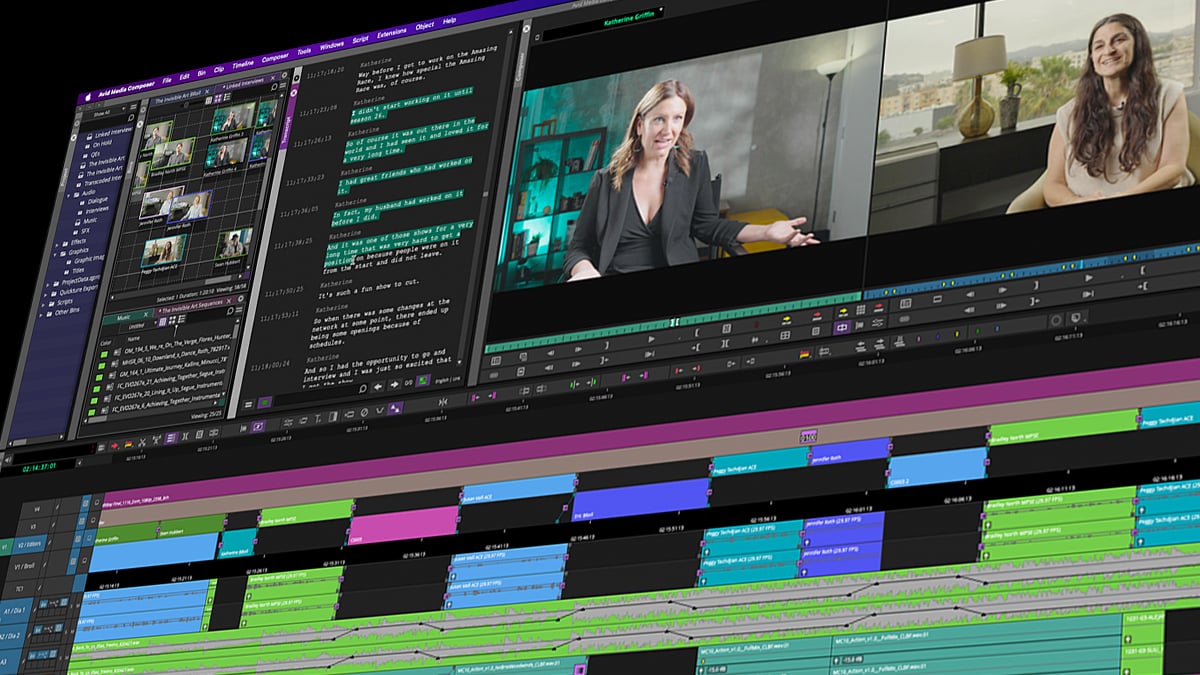
Eliminate the tedious process of scrubbing through hours of raw footage. Media Composer delivers advanced AI text-based video editing tools, allowing you to automatically transcribe audio, search dialogue instantly, and shape your story directly from the transcript.
Shape your story from dialogue
Automate footage transcription
Generate accurate, timecoded transcripts with AI, then click on any line to jump directly to that moment in the clip.
Search for dialogue across your project
Locate spoken words or phrases across hours of footage. PhraseFind AI indexes audible dialogue throughout your project, helping you uncover relevant clips without searching each transcript individually.
Navigate takes from the script
ScriptSync AI aligns imported scripts and transcripts with your media, surfacing every take associated with a specific line. Compare performances, check camera coverage, and select the right take for your edit.
Edit your sequence from the transcript
Select dialogue in the transcript to mark, add, remove, or rearrange corresponding footage in your sequence, accelerating rough cuts without scrubbing through clips.
Turn dialogue into multicam cuts
Automatically switch cameras to the active speaker in interviews, panels, and other dialogue-driven multicam edits, reducing the time you spend making manual camera cuts.
Watch the full videomore text-based editing features
Easy transcript sharing
Share transcription data between workstations via the Manage Transcript tool.
Transcript text editing
Clean up typos inside the Transcript Tool while keeping timeline sync.
Instant subtitle generation
Easily add subtitles to your sequence by generating SubCaps from transcripts.
Transcript archiving
Save media-linked text to the project so future backups won't lose data.
Great stories are cut on Media Composer
Editing F1® The Movie
Stephen Mirrione, ACE
See how Oscar® winner Stephen Mirrione used ScriptSync and Multicam to fast-track pacing and balance action with story.
Editing Wicked
Myron Kerstein, ACE
See how editor Myron Kerstein balanced massive cinematic spectacle to keep the focus on raw, intimate performances.
Conquer your heaviest dialogue projects
Turn raw dialogue into a searchable text blueprint you can edit your video from.
