VIDEO EDITING SOFTWARE FOR EVERYONE

Media Composer | First

Create with powerful free video editing software

Media Composer

Get the standard for independent video editors

Media Composer | Ultimate

Integrate workflows and collaborate as a team

Media Composer | Enterprise

Customize the interface for any production role

Media Composer is always getting better with new features and improvements. And with your active plan, you get them as soon as we release them.

See what's new in Media Composer

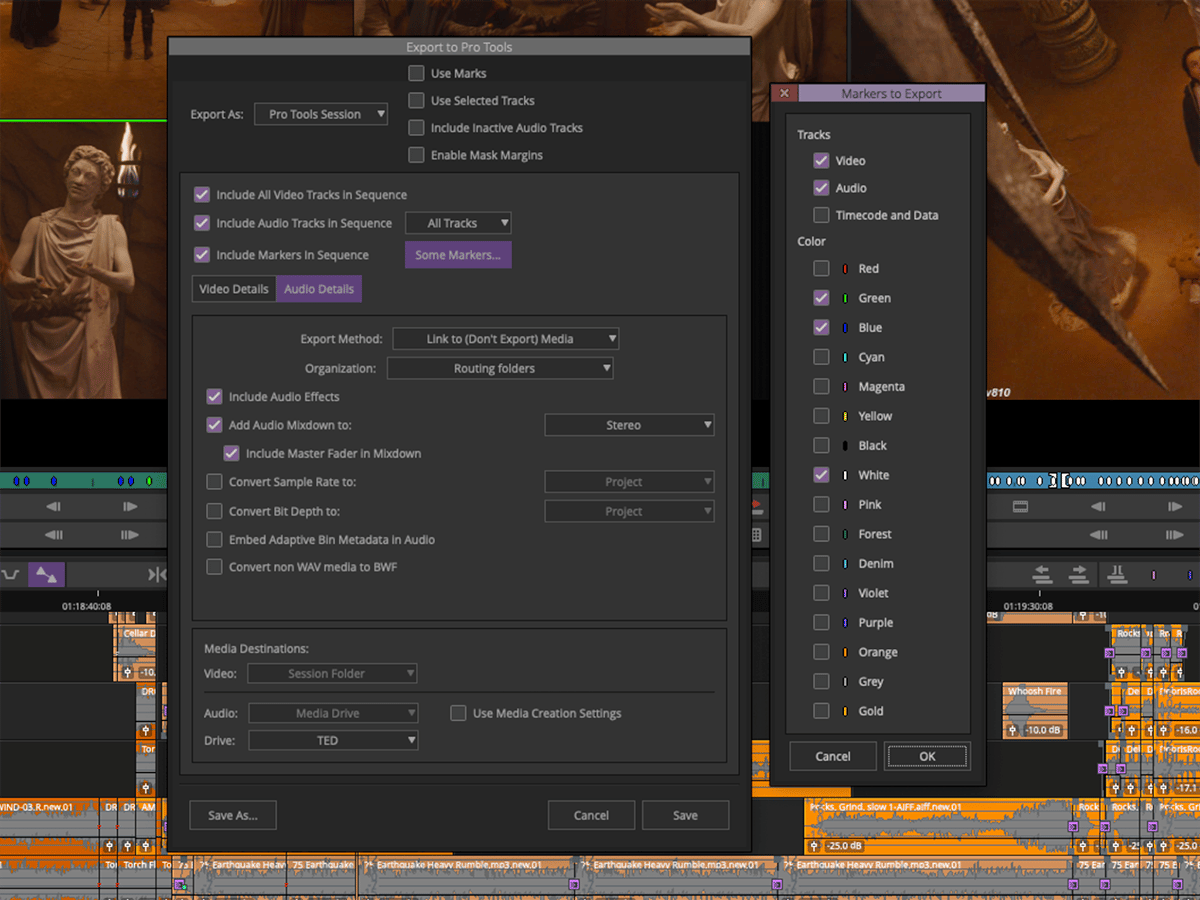
Media Composer now speaks the same language as Pro Tools. With the latest release, you can export a Pro Tools session directly from Media Composer along with your video sequence and edit points. You can also record, punch-in, and monitor multichannel audio using the new MBOX Studio—and more.

Get the details >

Media Composer is also now available in a new team plan, making it easy to manage, deploy, and add multiple licenses as needed.


Enjoy the latest episode of The Rough Cut

The Rough Cut Podcast features in-depth interviews with the top film, television and documentary post production professionals working in the industry today. Listen to editors talk about their craft, their latest projects and collaborating with their team. Hosted by @MattFeury of Avid Technology.

CREATE INSPIRED STORIES

VIDEO EDITING

From first cut to final finishing, get the tools every video editor needs to create compelling stories faster.

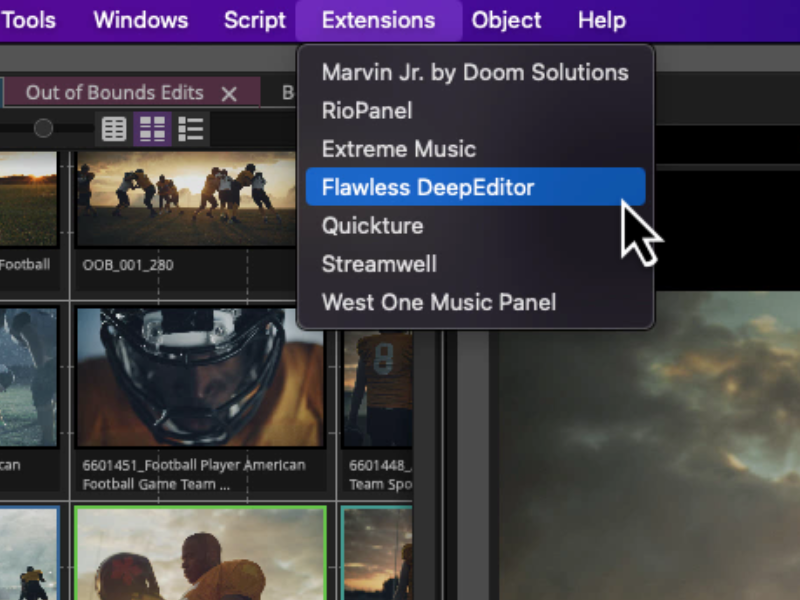
Work with any type of media

Import and edit footage from any camera, no matter the format, codec, or resolution. From HD and UHD, to HDR, 8K, and beyond, experience smooth, frame-accurate playback—even when mixing different types of video, audio, images, and frame rates.

Media Composer editing interface with icons of video hardware, cameras, and file names

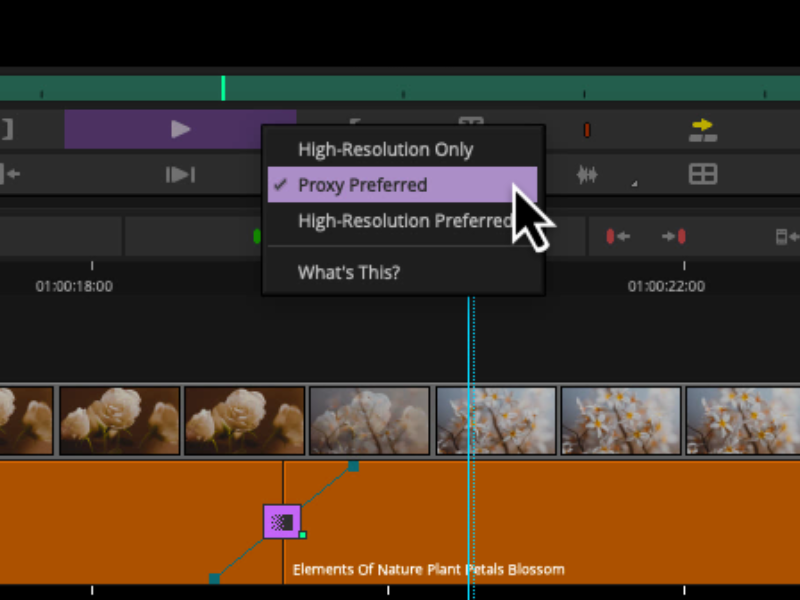
High-res, high efficiency

With the new Avid Media Engine, you can work with high-res, HDR, and proxy media more easily. Avid DNxHR and OpenEXR support eliminate bottlenecks, so you can work with a massive amount of media and quickly relink proxies to the original files with ease.

Track media with confidence

Media Composer keeps track of all projects, source material, rendered files, metadata, and other media, so you’ll never lose sight of your assets. Your project media will always be linked—even as projects move and evolve over the years.

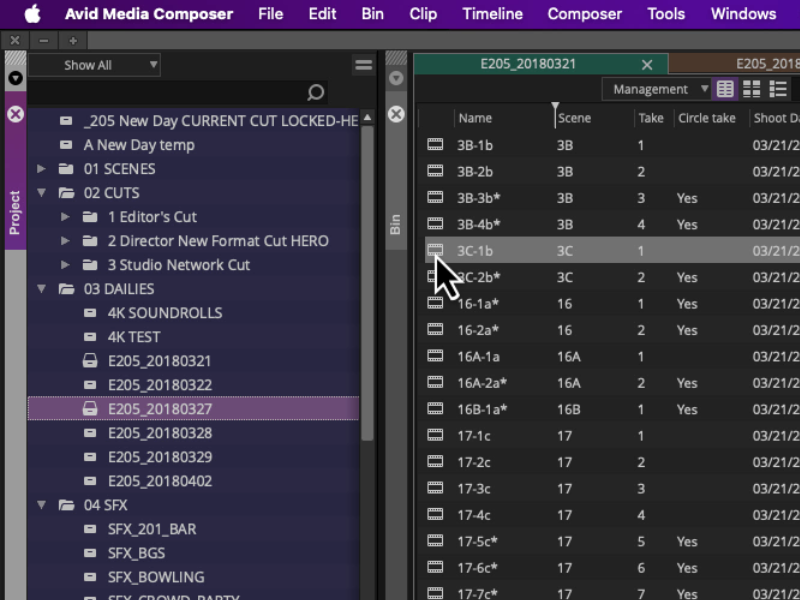
Organize and find files fast

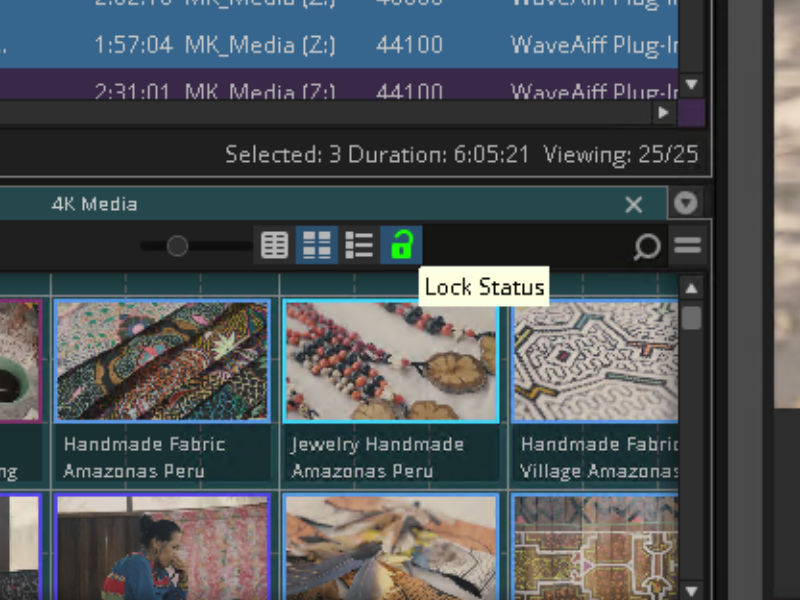
With new bin containers and mapping, you can organize and group content any way you want. Find footage in seconds, searching for clips and takes based on the dialogue they contain with the PhraseFind and ScriptSync options.

Work with any type of media

Import and edit footage from any camera, no matter the format, codec, or resolution. From HD and UHD, to HDR, 8K, and beyond, experience smooth, frame-accurate playback—even when mixing different types of video, audio, images, and frame rates.

Media Composer editing interface with icons of video hardware, cameras, and file names

High-res, high efficiency

With the new Avid Media Engine, you can work with high-res, HDR, and proxy media more easily. Avid DNxHR and OpenEXR support eliminate bottlenecks, so you can work with a massive amount of media and quickly relink proxies to the original files with ease.

Track media with confidence

Media Composer keeps track of all projects, source material, rendered files, metadata, and other media, so you’ll never lose sight of your assets. Your project media will always be linked—even as projects move and evolve over the years.

Organize and find files fast

With new bin containers and mapping, you can organize and group content any way you want. Find footage in seconds, searching for clips and takes based on the dialogue they contain with the PhraseFind and ScriptSync options.

Work with any type of media

Import and edit footage from any camera, no matter the format, codec, or resolution. From HD and UHD, to HDR, 8K, and beyond, experience smooth, frame-accurate playback—even when mixing different types of video, audio, images, and frame rates.

Media Composer editing interface with icons of video hardware, cameras, and file names

High-res, high efficiency

With the new Avid Media Engine, you can work with high-res, HDR, and proxy media more easily. Avid DNxHR and OpenEXR support eliminate bottlenecks, so you can work with a massive amount of media and quickly relink proxies to the original files with ease.

Track media with confidence

Media Composer keeps track of all projects, source material, rendered files, metadata, and other media, so you’ll never lose sight of your assets. Your project media will always be linked—even as projects move and evolve over the years.

Organize and find files fast

With new bin containers and mapping, you can organize and group content any way you want. Find footage in seconds, searching for clips and takes based on the dialogue they contain with the PhraseFind and ScriptSync options.

Do more, stress less

media-composer-do-more-stress-less

The next-generation Avid Media Engine gives you more power and speed, so you can stay focused on what matters most—your story.

The next-generation Avid Media Engine gives you more power and speed, so you can stay focused on what matters most—your story.

From intelligent media handling, to automated tasks, Media Composer takes the work out of your workflow.

Go big—up to 8K and beyond

Experience smooth, reliable editing and playback performance, no matter how large your source files are. Work with all the beautiful, high-resolution image detail of the original media for better editing precision, without your workflow coming to a standstill.

Optimized for the best HDR experience

From capture to edit, finishing to output, Media Composer provides the high-efficiency media handling, ACES color space, and 32-bit floating color pipeline you need to deliver HDR content predictably, with pristine accuracy.

Go big—up to 8K and beyond

Experience smooth, reliable editing and playback performance, no matter how large your source files are. Work with all the beautiful, high-resolution image detail of the original media for better editing precision, without your workflow coming to a standstill.

Optimized for the best HDR experience

From capture to edit, finishing to output, Media Composer provides the high-efficiency media handling, ACES color space, and 32-bit floating color pipeline you need to deliver HDR content predictably, with pristine accuracy.

Get rewarded

;" 

Whether you’re a new or longtime Media Composer user, get additional partner software (worth more than $700 USD) on us.

Whether you’re a new or longtime Media Composer user, get additional partner software (worth more than $750 USD) on us.

Maintain your Media Composer subscription or annual updates plan and get the following software as complimentary gifts* from Avid and our partners.

Go big—up to 8K and beyond

Experience smooth, reliable editing and playback performance, no matter how large your source files are. Work with all the beautiful, high-resolution image detail of the original media for better editing precision, without your workflow coming to a standstill.

Optimized for the best HDR experience

From capture to edit, finishing to output, Media Composer provides the high-efficiency media handling, ACES color space, and 32-bit floating color pipeline you need to deliver HDR content predictably, with pristine accuracy.

Go big—up to 8K and beyond

Experience smooth, reliable editing and playback performance, no matter how large your source files are. Work with all the beautiful, high-resolution image detail of the original media for better editing precision, without your workflow coming to a standstill.

Optimized for the best HDR experience

From capture to edit, finishing to output, Media Composer provides the high-efficiency media handling, ACES color space, and 32-bit floating color pipeline you need to deliver HDR content predictably, with pristine accuracy.

Maintain your Media Composer subscription or annual updates plan and get the following software as complimentary gifts* from Avid and our partners.

GET WORKFLOWS THAT WORK

PRODUCTION TEAMS 

Experience the collaborative, efficient workflows top video professionals rely on.

Experience the collaborative, efficient workflows top video professionals rely on.

Share projects, edit remotely, and have more control over your production. The flexibility you need to accelerate and manage your workflow starts here. Plus, manage multiple licenses and users easily with Media Composer for teams

Go big—up to 8K and beyond

Experience smooth, reliable editing and playback performance, no matter how large your source files are. Work with all the beautiful, high-resolution image detail of the original media for better editing precision, without your workflow coming to a standstill.

Optimized for the best HDR experience

From capture to edit, finishing to output, Media Composer provides the high-efficiency media handling, ACES color space, and 32-bit floating color pipeline you need to deliver HDR content predictably, with pristine accuracy.

Work with any type of media

Import and edit footage from any camera, no matter the format, codec, or resolution. From HD and UHD, to HDR, 8K, and beyond, experience smooth, frame-accurate playback—even when mixing different types of video, audio, images, and frame rates.

Media Composer editing interface with icons of video hardware, cameras, and file names

Keep production moving

With the Distributed Processing option, included with Media Composer | Enterprise, you can offload time-consuming rendering, transcoding, and exporting tasks to unused or idle networked computers, freeing up Media Composer workstations, and taking wasteful downtime out of the process.

Discover Media Composer | Distributed Processing >

Go big—up to 8K and beyond

Experience smooth, reliable editing and playback performance, no matter how large your source files are. Work with all the beautiful, high-resolution image detail of the original media for better editing precision, without your workflow coming to a standstill.

Optimized for the best HDR experience

From capture to edit, finishing to output, Media Composer provides the high-efficiency media handling, ACES color space, and 32-bit floating color pipeline you need to deliver HDR content predictably, with pristine accuracy.

Newsroom with people at computers around a multiscreen display wall

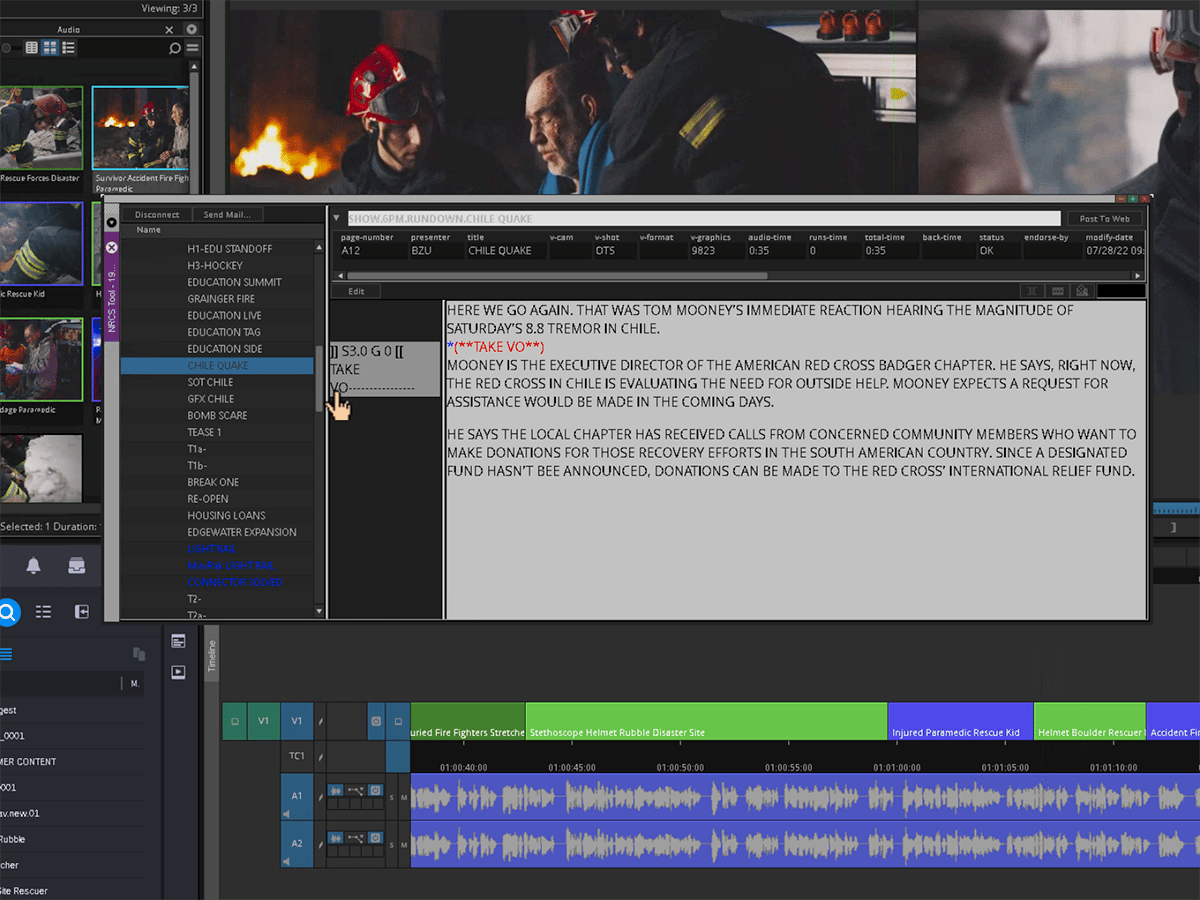
Bridge workflows between teams

For editors working in news, sports, and studio production environments, Media Composer integrates with MediaCentral, enabling teams to connect and access content locally and remotely across the entire platform ecosystem.

Accelerate your edit

Boost your Media Composer capabilities with advanced tools for color and news workflows.

Add super-powers to Media Composer with advanced tools for color and news workflows.

Maintain your Media Composer subscription or annual updates plan and get the following software as complimentary gifts* from Avid and our partners.

Go big—up to 8K and beyond

Experience smooth, reliable editing and playback performance, no matter how large your source files are. Work with all the beautiful, high-resolution image detail of the original media for better editing precision, without your workflow coming to a standstill.

Optimized for the best HDR experience

From capture to edit, finishing to output, Media Composer provides the high-efficiency media handling, ACES color space, and 32-bit floating color pipeline you need to deliver HDR content predictably, with pristine accuracy.

Go big—up to 8K and beyond

Experience smooth, reliable editing and playback performance, no matter how large your source files are. Work with all the beautiful, high-resolution image detail of the original media for better editing precision, without your workflow coming to a standstill.

Optimized for the best HDR experience

From capture to edit, finishing to output, Media Composer provides the high-efficiency media handling, ACES color space, and 32-bit floating color pipeline you need to deliver HDR content predictably, with pristine accuracy.

AVID NEXIS | EDGE

Remote collaboration made easy

Enable editors to work from anywhere without changing their workflow and extend collaboration to assistants, showrunners, producers, and other creative contributors. Plus, it's included with Media Composer | Enterprise at no additional charge!

Discover Avid NEXIS | EDGE >

NEXIS EDGE 852x480
Video editor working on a laptop at a table

AVID | EDIT ON DEMAND

Access your edit suite anywhere

Expand your production team and ramp up new projects at a moment’s notice with a fully provisioned virtual editing suite in the cloud—complete with cloud-optimized Media Composer software and Avid NEXIS storage.

Discover Edit On Demand >

BEAUTIFUL PERFORMANCE—IN AND OUT

AVID ARTIST I/O 

Capture, monitor, and output high-res media with powerful video interfaces that offer exceptional performance and versatility. 

Avid Artist DNxIV Portable 4k Video Editing Hardware front

Avid Artist | DNxIV

Avid Artist | DNxIV

Create SD–4K content from anywhere with this portable, low-cost desktop video interface. It offers a variety of analog and digital I/O, direct audio recording to the Media Composer timeline, HDR monitoring, and up to 7.1 surround monitoring capabilities.

Avid Artist DNxIQ Video Capture HDR Hardware front

Avid Artist | DNxIQ

Avid Artist | DNxIQ

Get an extensive array of analog and digital I/O for SD–4K capture, HDR monitoring, and output. It offers built-in baseband encoding to Avid DNxHR, audio punch-in to Media Composer, Universal Mastering, and connects to the widest range of cameras and devices.

GET INTELLIGENT STORAGE

AVID NEXIS 

Enable real-time media production with a bullet-proof storage platform offering powerful, predictable performance.

Avid NEXIS Post Production Video Storage Hardware

Avid NEXIS

Avid NEXIS

Collaborate in real time with the industry’s leading shared storage platform. Get the performance, scalability, protection, and reliability top broadcasters rely on to accelerate production, enable up to 330 contributors to work together, and adapt quickly to evolving production requirements.

Avid NEXIS PRO Shared Storage Video Editing Hardware

Avid NEXIS | PRO+

Avid NEXIS | PRO+

Get the performance and reliability of Avid NEXIS in a more affordable system designed for smaller video teams. Get the same secure workflows trusted by an industry and accelerate your media workflow in real time with up to 24 collaborators.

Avid NEXIS E5 NL Nearline Storage Video Editing

NEXIS | F5 NL

NEXIS | F5 NL

Park, preview, and retrieve inactive assets and projects with ease. This nearline/archive storage solution is the ideal companion to Avid NEXIS, offering highly scalable, multilevel protected storage.

MIX AUDIO—HANDS-ON

CONTROL SURFACES

Get extensive touch and tactile control to speed up audio recording, editing, and mixing tasks in Media Composer.

Avid S1 8-fader slimline control surface integrated with the free Avid Control app on a tablet

Avid S1

Avid S1

Get the speed and visual feedback of Avid's high-end consoles in a slimline surface. Avid S1 works together with the free Avid Control app on your tablet, providing 8 faders, plus Avid S6-style metering and processing views, to create great-sounding mixes fast.

Avid Dock Control Surface

Avid Dock

Avid Dock

Get full transport controls, a jog wheel, and intelligent studio control in a portable, ergonomic surface. Working with the free Avid Control app, Avid Dock provides the quick access and tactile precision you need to navigate and control projects.

Avid Control Surface For Soundtracks

Avid Control

Avid Control

Take control of Media Composer and other software right from your tablet. This free app enables you to use your iPad or Android tablet to edit and mix soundtracks faster and easier than working with a mouse and keyboard alone.

AVID LINK

Connect. Collaborate. Get Discovered.

Join a vibrant creative community of other video and audio creators. Expand your opportunities, promote your work, and find new talent—all in one free app.

Get Avid Link >

Avid Link interface displayed on a laptop and a smartphone

GET THE HELP YOU NEED

TUTORIALS 

Get up and running fast, with tutorials for new Media Composer users, as well as for Premiere Pro and Final Cut editors. 

Meet the modern Media Composer

Get a walkthrough of the new interface and features

Install Media Composer

Get started on your video editing journey

Set up a project

Organize projects and log clips and sequences

Editing and customization

Navigate workspaces and shape your story

Effects and Color

Get started using effects and color in your projects

Export and delivery

Finalize sequences and export for multiple formats

Meet the modern Media Composer

Get a walkthrough of the new interface and features

Install Media Composer

Get started on your video editing journey

Set up a project

Organize projects and log clips and sequences

Editing and customization

Navigate workspaces and shape your story

Effects and Color

Get started using effects and color in your projects

Export and delivery

Finalize sequences and export for multiple formats

Transition from Premiere Pro

Get started with Media Composer using your Adobe knowledge

Project basics

Learn the ins and outs of working with Media Composer

Importing media

Add video footage and other sources to a project

Media management

Get insight into how media is managed across projects

VFX and titling

Create stunning visual effects and titles

Exporting media

Finalize sequences and export media

Transition from Premiere Pro

Get started with Media Composer using your Adobe knowledge

Project basics

Learn the ins and outs of working with Media Composer

Importing media

Add video footage and other sources to a project

Media management

Get insight into how media is managed across projects

VFX and titling

Create stunning visual effects and titles

Exporting media

Finalize sequences and export media

Discover Media Composer 2020.4

Avid product expert Michael Krulik walks you through some of the new features of the Media Composer 2020.4 release.

Media Composer - Basics with the Avid Titler +

Getting started with the Avid Titler + and creating a simple lower third for all high resolution formats

Keyboard Shortcuts in Media Composer

Speed up your editing with keyboard shortcuts and new features

The Bin Container in Media Composer

Organize your bins with background colors, sizes, and arrangements to ease your video workflow

Edit, Color, Effects, & Audio Workspaces

Learn how to customize your workspaces for editing, coloring, effects, and audio layouts

The Media Composer 3D Warp Tool

Create advanced effects and transitions with the Media Composer 3D Warp Tool

Discover Media Composer 2020.4

Avid product expert Michael Krulik walks you through some of the new features of the Media Composer 2020.4 release.

Media Composer - Basics with the Avid Titler +

Getting started with the Avid Titler + and creating a simple lower third for all high resolution formats

Keyboard Shortcuts in Media Composer

Speed up your editing with keyboard shortcuts and new features

The Bin Container in Media Composer

Organize your bins with background colors, sizes, and arrangements to ease your video workflow

Edit, Color, Effects, & Audio Workspaces

Learn how to customize your workspaces for editing, coloring, effects, and audio layouts

The Media Composer 3D Warp Tool

Create advanced effects and transitions with the Media Composer 3D Warp Tool

POWER YOUR IMAGINATION

GET MEDIA COMPOSER

Media Composer has an option for everyone, from students to high-level post-production teams and broadcasters. 

Compare versions

Media Composer | First

Create with powerful free video editing software

Media Composer

Get the standard for independent video editors

Media Composer | Ultimate

Integrate workflows and collaborate as a team

Media Composer | Enterprise

Customize the interface for any production role

Students and teachers

Get special pricing on Media Composer, starting at $9.99/mo USD, with verified academic eligibility.

See your options >

Enterprise and institutions

Get Media Composer for teams or find more licensing options.

Contact us >

Already have Media Composer?

Upgrade to the latest version and get access to all new features, loyalty rewards, and more.

See your options >