Baby Audio
Baby Audio Parallel Aggressor
A unique compressor and saturation plugin that splits audio into three tracks, combining dry, compressed, and saturated signals for enhanced punch and presence.
$69USD
Compatible with:
macOSWindowsAAXAUVST3
Plugins cannot be returned after purchase
Description
Add Triple Impact To Your Tracks
- Parallel Aggressor lets you add parallel saturation and parallel compression from within one plugin window.
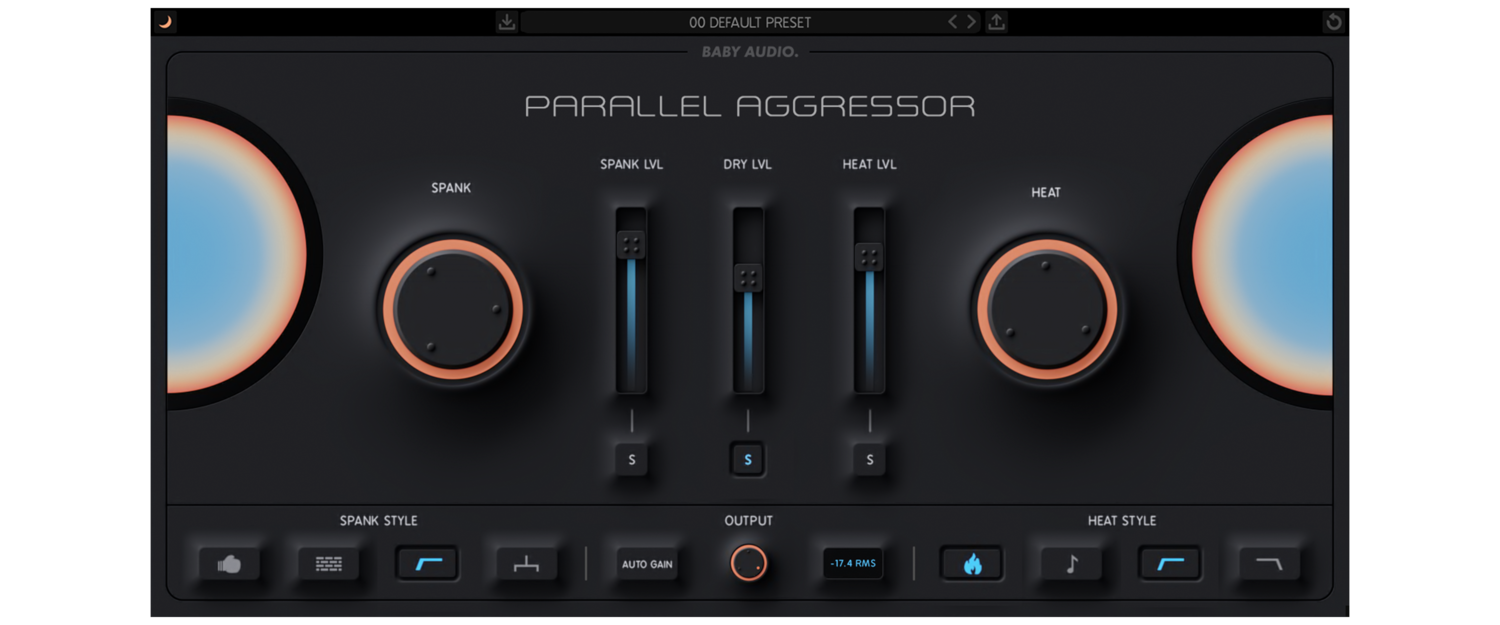
- It splits your audio into three individual tracks: Saturated duplicate, Compressed duplicate, Dry Original.
- Balance the three signals to add impact and punch while retaining the dynamics of your original track.
Parallel Aggressor comes with 25 presets created by friends of BABY Audio - including:
- KurtCurt (Grammy nominated engineer for 2 Chainz, Diamond D, Wiz Khalifa)
- Anthony Saffery (Producer for Portugal. The Man, Dirty Vegas, Cornershop)
Features
- Parallel Engine 1: Spank - "Spank" offers an addictively punchy parallel compression sound. Set the effect amount by dialing the main "Spank" wheel. Then use style injection buttons to control the behavior of the algorithm. Finally, use the volume slider to set the amount of "spank"/parallel compression you want blended in with your signal. Style injection buttons: Extra Punch, Extra Smack, Sidechain Filter, Mono.
- Setting the mix balance - Balance Parallel Aggressor's three parallel signals with the volume faders in the center of the plugin interface.
- Listening in solo: The solo buttons below the volume sliders let you monitor each parallel signal individually for fine-tuning purposes.
- Display options - Switch between black, gray and white background colors.
- Parallel Engine 2: Heat - "Heat" is a warm, analog modeled, saturation algorithm with an aggressive bite. It will add some rich, non-linear harmonics to blend in with your signal. Set the saturation intensity by dialing the main "Heat" wheel - then use the style injection buttons to control the behavior of the engine. Finally, use the volume slider to set the amount of "Heat"/parallel saturation you want blended in with your signal. Style injection buttons: Extra Hot, Tone, HP Filter, LP Filter.
- Auto Gain - Engage "Auto Gain" to ensure that the combined level of the plugin's three signals roughly matches the input/dry level. This allows you to experiment with different internal mix balances while keeping a consistent plugin output.
- Mixing with the meters - The plugin interface's left and right side meters help you set the appropriate amount of "Spank" and "Heat" for any audio signal. As a general rule of thumb, we recommend you dial the Spank/Heat wheels to taste until the respective meters peak somewhere before the orange line.
Unlock exclusive Pro Tools rewards
Access a curated collection of over $3,500 in free plugins and sound libraries with annual plans.
